
Blogs
How to Build a Multiplayer Game Without Writing Code

The dream of creating a vibrant online world where friends can connect, compete, and collaborate is no longer exclusive to seasoned programmers. The once-daunting landscape of Game Development has been dramatically reshaped by the emergence of powerful no-code platforms and intuitive no-code game development tools. These revolutionary platforms empower anyone with a creative vision to bypass the steep learning curve of traditional coding and dive directly into the heart of game design. Whether you envision a fast-paced arena brawler, a cooperative survival challenge, or a charming social experience, building multiplayer games without writing a single line of code is now not just possible, but remarkably accessible. This guide will walk you through how to transform your multiplayer game ideas into reality using the cutting-edge tools available today.
What “No-Code Multiplayer” Actually Means
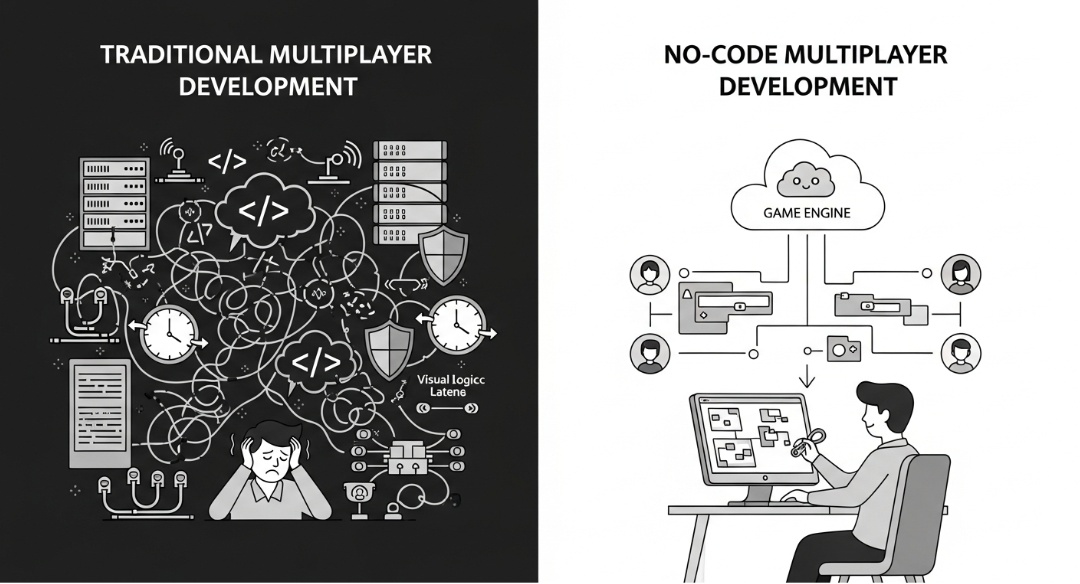
No-code platforms abstract away complex backend networking, allowing creators to focus on game design using visual tools.
Traditionally, creating multiplayer games has been synonymous with complex network programming. This involves intricate details like managing game servers, configuring server infrastructure, implementing synchronization logic to ensure all players see the same game state, and handling latency compensation to smooth out the inevitable delays in online communication. Developers would grapple with peer-to-peer networking, sending HTTP Get requests, or implementing protocols like websocket protocol, all while ensuring robust security measures and DDoS protection. The need for sophisticated server programs and cloud hosting presented significant technical and financial hurdles, especially for independent developers.
“No-code multiplayer” fundamentally redefines this paradigm. These platforms abstract away the vast majority of this underlying complexity. Instead of writing lines of code to manage connections and data, you utilize drag-and-drop interfaces, visual scripting, and visual editors. These tools provide a Drag-and-Drop System where you connect logic blocks or define events visually. The game engines powering these platforms handle the heavy lifting of networking, load balancing, and synchronization logic automatically. This allows creators to focus on the core game mechanics, character creation, level design, and the overall user experience, bringing multiplayer and social gameplay to life without needing to master traditional network programming.
Pick the Right No-Code Multiplayer Game Maker
The effectiveness of your no-code multiplayer game development journey hinges on selecting the right tool. Not all no-code platforms are built with robust online play in mind. Some are optimized for single-player experiences, while others may require significant external plugins or workarounds to achieve multiplayer functionality. To truly succeed in building engaging online multiplayer games, you need a platform specifically designed with connectivity at its core, offering intuitive systems for player interaction and seamless deployment.
Features You Need for Multiplayer
When evaluating no-code game development tools for multiplayer projects, several key features are non-negotiable. Firstly, look for native support for rooms and lobbies. These are the digital waiting areas where players gather and connect before a match begins. If a platform necessitates third-party plugins for basic player connection, it might stray too far from a true no-code experience for beginners.
Secondly, prioritize browser capability. The path of least resistance for player acquisition is crucial. You want a tool that offers straightforward hosting and publishing options, ideally generating shareable room links. This allows friends to jump into a session instantly via their web browser, fulfilling the expectation of “play with friends online” without the friction of downloads or installations. This immediate accessibility is paramount for fostering organic growth and making the social aspect of your game effortless. Furthermore, consider the tool’s ability to support multi-platform export, especially to mobile devices, ensuring your game reaches the widest possible audience.
Popular No-Code Multiplayer Game Makers
The landscape of no-code game creation is rapidly evolving, with several platforms standing out for their multiplayer capabilities.
- Construct 3: A leading choice for 2D game development, Construct 3 offers a powerful event-based system that functions as a sophisticated visual scripting tool. Its built-in multiplayer plugin makes it relatively straightforward to implement real-time online interactions. It boasts an extensive asset library and supports multi-platform export, making it ideal for 2D action, arcade, and platformer game genres.
- Astrocade: Astrocade is a modern no-code platform focused on creating real-time multiplayer and social games with minimal setup. It emphasizes cloud-based multiplayer infrastructure, allowing creators to build and scale online games without managing servers or complex networking logic. With a visual development environment and built-in backend services, Astrocade is particularly well-suited for experimental multiplayer concepts, social experiences, and rapid prototyping.
- RPG Maker: While historically focused on JRPGs, modern versions of RPG Maker have evolved to include features that can facilitate multiplayer experiences, particularly for turn-based or menu-driven games. Its visual editor and pre-built systems can accelerate the creation of narrative-heavy multiplayer adventures, though it might require more effort for real-time action games.
- GameMaker Studio 2: This versatile game engine offers both a traditional coding option (GML) and a visual drag-and-drop interfaces system. GameMaker Studio 2 has a strong track record for enabling developers to build and deploy multiplayer games across various platforms, including mobile devices. Its flexibility makes it suitable for a wide range of game genres, from fast-paced shooters to intricate simulations.
- Roblox Studio: A highly popular platform where users create and play games within the Roblox ecosystem. Roblox Studio provides a robust suite of tools for building 3D experiences, including a comprehensive visual editor and scripting capabilities. Its built-in networking services are designed for massive online multiplayer game experiences and social interaction, offering a ready-made community and infrastructure for your creations.
- Unity with Bolt / Unity Visual Scripting: While Unity is a full-fledged professional game engine, its integration of visual scripting (formerly Bolt) allows developers to create complex logic without traditional coding. For multiplayer, this approach can be highly effective, offering immense power and flexibility, though it might involve a slightly steeper learning curve than purely no-code solutions. It provides access to a vast Asset Store for all your asset creation needs.
- Unreal Engine Blueprints: Similar to Unity, Unreal Engine is a professional-grade game engine that offers its powerful visual scripting system, Blueprints. This system enables the creation of intricate game mechanics and multiplayer logic through a node-based interface. Its strength lies in its ability to handle high-fidelity 3D graphics and complex game genres, making it a compelling choice for ambitious no-code multiplayer projects, especially for PC and console development.
- GDevelop: An open-source game engine that is entirely free and uses a visual event-based system for logic. GDevelop has built-in support for peer-to-peer networking and can also be configured to use server-based multiplayer solutions. Its accessibility and drag-and-drop interfaces make it an excellent starting point for 2D multiplayer games and those targeting web and mobile devices.
Choose a Multiplayer Game Idea That Works Without Code
The power of no-code tools is undeniable, but it’s crucial to align your game concept with the capabilities of these platforms. Attempting to build a massive multiplayer online (MMO) game with thousands of concurrent players in a single persistent world, or a hyper-realistic simulation with extremely complex physics, might push the boundaries of what is currently achievable without traditional coding. Success in no-code multiplayer development often comes from choosing a scope that plays to the strengths of the tools you select.
Simple Multiplayer Patterns That Work Well
When embarking on no-code multiplayer game development, focusing on established patterns that perform well in browser-based environments is key to a smooth development process and an enjoyable player experience. Co-operative survival games, where players band together to fend off waves of enemies or manage resources, are excellent starting points. These often involve shared goals and can be scaled effectively.
Similarly, small-team arena-style games, such as 2v2 or 3v3 competitive matches, are ideal. They limit the number of players and the complexity of the game state that needs to be synchronized, significantly reducing performance strain. For instance, a sports game with a few players on a small field is far more manageable than a sprawling open-world sports simulation. Four-player racing games also work beautifully for similar reasons; the focus is on speed, reaction, and predictable movement rather than managing hundreds of independent entities simultaneously.
Consider the thriving market for “casual games” and “viral games.” These often feature short, engaging sessions, simple controls, and the ability for quick rematches, all of which mask minor network imperfections and keep player engagement high. .io games, where players grow larger by collecting items and competing against others in a shared arena, are a prime example. Their fun factor stems directly from emergent player interaction and simple, easily understood rules, making them perfect candidates for no-code implementation.
Design for “Play With Friends Online”
Given that you likely won’t be building a complex, server-heavy matchmaking system akin to those found in AAA titles like Call of Duty, it’s essential to design your game around a more direct “play with friends online” model. This typically means leveraging features like direct links or unique room codes that players can share. This approach fosters a more personal and accessible multiplayer experience, where users can easily invite their immediate circle to join their game.
To enhance the feeling of a connected community, incorporate lightweight social features. Simple additions, such as allowing players to choose and display a nickname, implementing a basic chat box for quick communication, or even offering a selection of emotes for non-verbal expression, can significantly enrich the player experience. Even a rudimentary leaderboard that tracks scores or wins within a single session can add a compelling competitive layer, encouraging friends to engage in repeat play. This focus on direct social interaction, rather than broad matchmaking, aligns perfectly with the strengths of no-code platforms.
Step-by-Step: Build a No-Code Multiplayer Game
With your chosen tool and a well-defined multiplayer game idea, it’s time to bring your concept to life. This structured approach will guide you through the essential stages of development, from leveraging existing resources to testing and refining your creation for maximum player enjoyment.
Step 1 – Start from a Template or Example
The most efficient way to begin your no-code multiplayer journey is by eschewing the blank canvas and diving into pre-built resources. Open your chosen multiplayer game maker online and look for a “Multiplayer” starter project or template. Most comprehensive platforms, including GDevelop and Construct 3, offer a selection of ready-made examples covering popular multiplayer game genres like racing, platforming, and top-down shooters.
Utilizing a template is a significant time-saver. These pre-configured projects typically include the foundational logic for player spawning, room creation, basic player synchronization, and often the core networking setup. Instead of spending hours configuring server connections and basic synchronization logic, you can focus on customizing the game’s assets, tweaking game mechanics, and refining the user experience to match your unique vision. This foundational structure provides a robust starting point, allowing you to concentrate on the creative aspects rather than the underlying infrastructure.
Step 2 – Build Your First Multiplayer Level
Once you have your chosen template open, the next step is to leverage the platform’s visual editor and drag-and-drop interfaces to construct your game’s environment. This involves placing essential elements such as spawn points, where players will materialize at the start of each match. Populate your arena with obstacles, platforms, walls, and any interactive elements relevant to your game mechanics.
When designing your maps for an online, no-download environment, performance is paramount. Opt for smaller, well-defined levels. A streamlined arena ensures that your game runs smoothly across a wide range of devices, including less powerful mobile devices, and keeps the action focused and intense. If players are spending excessive time navigating vast, empty spaces searching for opponents, they are likely to become disengaged. A concise map design not only boosts performance but also enhances player immersion by keeping them at the heart of the action. Furthermore, consider how the level design supports your chosen game genre and promotes interesting player interactions.
Step 3 – Configure Player Rules and Game Logic
This is where the core of your game’s unique identity takes shape. Using the tool’s intuitive visual logic panels or property inspectors, you will define the rules that govern how players interact with the game world. Consider elements such as player movement speed, health points, damage values, and the specific effects of various game mechanics. This is also where you’ll implement character creation options, allowing players to customize their appearance.
Crucially, you must also adjust the session rules to suit your multiplayer design. Set the maximum player count for your game, for instance, limiting it to 4 players for a co-op experience or a tight competitive match. Define the win condition, whether it’s the first player to reach a certain score, the last one standing, or the first to complete a specific objective. Ensuring that game rounds are relatively short and dynamic helps to mask any minor internet latency and maintains a high level of energy and engagement throughout play sessions. This focus on responsive and immediate gameplay is a hallmark of successful no-code multiplayer titles.
Step 4 – Add Multiplayer UI and Feedback
Effective user interface (UI) and clear visual feedback are critical for a positive user experience in any game, but especially in multiplayer games. Players need immediate and unambiguous information about what is happening in the game. Implement a UI layer that displays essential details such as player names hovering above their avatars, a live scoreboard tracking scores or progress, a game timer, and clear notifications for the start and end of rounds.
Visual feedback is paramount for confirming player actions and making the game feel responsive, even when there’s a slight delay due to internet latency. For example, if a player successfully hits an opponent, there should be a clear visual effect,such as a flash of light, particle burst, or hit indicator—accompanied by an appropriate sound effect. This immediate confirmation assures the player that their action was registered by the game server (or the peer-to-peer network) and processed correctly, making the gameplay feel fluid and impactful. This attention to detail significantly enhances player immersion and satisfaction.
Step 5 – Test With Friends in the Browser
The inherent advantage of browser-based development, common with many no-code tools, lies in the accelerated testing cycle. You bypass lengthy compilation times and can often preview or publish your game directly to the web with a single click. Once published, generate a lobby link or room code and share it with a few friends. Running test sessions is invaluable for identifying bugs, performance issues, and areas for improvement.
During these playtests, focus on “readability”, can players easily understand who is winning, what the objectives are, and when the game concludes? Actively solicit feedback regarding lag, unexpected behavior, or confusing mechanics. Armed with this direct player input, you can then iterate within your no-code editor, making adjustments to movement speeds, map layouts, or game logic to optimize the gameplay experience. This iterative testing process, especially with your target audience, is crucial for refining your game into a polished product.
Browser Publishing and No-Download Play
The ultimate goal for many no-code multiplayer games is to achieve immediate accessibility. When your game is ready, utilize the built-in publishing options provided by your chosen platform. Most no-code game development tools offer straightforward exports to HTML5, or they provide integrated hosting services. This capability is vital for meeting user expectations for “online games” and “online free games,” where players anticipate being able to click and play instantly without the hassle of installations, downloads, or lengthy update processes. This friction-free entry point dramatically increases the likelihood that players will try your game and keep coming back.
Turn It into a Social, Shareable Experience
Once your multiplayer game is live and accessible, the focus shifts to distribution and community building. Share your game’s link across relevant platforms, your Discord server, social media channels, gaming forums, or community subreddits. The absence of a download barrier significantly lowers the hurdle for new players to try your creation.
To amplify its viral potential, consider embedding “hooks” that encourage sharing. This could involve implementing a “Daily Challenge” mode with unique objectives, a “Party Mode” that introduces wacky physics for lighthearted fun, or a simple invite system where players can easily share links with their own friend groups. These features not only add replayability but also effectively turn your players into your game’s marketing team, driving organic growth through word-of-mouth and shared experiences.
What No-Code Multiplayer Handles for You
It is crucial to appreciate the sophisticated engineering that no-code platforms handle behind the scenes, liberating you to focus on game design. These engines automatically manage critical aspects like state synchronization, ensuring that every player experiences a consistent and coherent game world. They also deal with latency handling, employing techniques to smooth out jittery movement and server responses, creating a more fluid gameplay experience. Furthermore, the underlying infrastructure for hosting and managing player connections is typically taken care of, freeing you from the complexities of server infrastructure and cloud hosting. This allows you to concentrate your efforts on the fun elements: crafting compelling game mechanics, designing engaging levels, and building a captivating user experience.
When You Might Outgrow No-Code
While no-code platforms are incredibly powerful and have democratized game development, they are not a universal solution for every conceivable project. If your ambition is to create a massively multiplayer online (MMO) game with thousands of concurrent players in a single, persistent world, or a simulation requiring extremely high-fidelity physics and custom network protocols, you may eventually encounter the limitations of these tools. Such highly complex projects often necessitate custom server-side code and deep integration with traditional programming languages like the Go Programming Language for its efficiency in concurrent systems, or a more granular control over network programming.
However, for the vast majority of independent developers, hobbyists, and creators, no-code solutions offer more than enough power and flexibility. If you do reach a technical ceiling, the foundational skills you’ve acquired, understanding logic, design principles, and game mechanics through visual scripting, will translate seamlessly as you potentially explore low-code options or even delve into traditional scripting languages for specific extensions. The journey into no-code can serve as an excellent stepping stone to more advanced development.
Start Building Your Online Arena
The barrier to entry for creating interactive digital experiences, especially multiplayer games, has never been lower. You no longer need a computer science degree or years of formal training to bring people together in a shared virtual space. By carefully selecting the right AI game maker or no-code platform, you can transform a simple, fun idea into a playable reality, often within a single weekend.
Don’t get bogged down by the perceived technical complexities of the technology stack. The most effective approach is to choose a tool that resonates with you, grab a readily available template, and simply start building. The essence of no-code game development is iterative progress and hands-on creation. Your friends are already waiting in the lobby; it’s time to build the game they’ll play.
1. Can I really build a multiplayer game with zero coding?
Absolutely! No-code platforms like GDevelop or Construct 3 handle all the tricky networking, servers, and sync stuff behind the scenes. You just drag, drop, and tweak visuals – no servers or WebSockets required.
2. What’s the best no-code tool for my first multiplayer game?
Start with GDevelop (free, browser-based) or Construct 3. They have ready multiplayer templates for 2D arenas, racing, or co-op, plus easy room links for friends to join instantly.
3. What kinds of multiplayer games are easiest without code?
Keep it simple: 2v2 arenas, 4-player racing, co-op survival waves, or .io-style eat-and-grow battles. Short sessions (1-5 mins) with small maps work best to avoid lag.
4. How do friends join my game online?
Use room links or codes from the platform – share via Discord or WhatsApp. No matchmaking needed; design for “play with friends” with nicknames, quick chat, emotes, and session leaderboards.
5. How do I test multiplayer before publishing?
Hit “preview” or publish a test link, invite 2-4 friends, and play in browsers. Check for lag, sync issues, and fun factor – tweak speeds/UI on the fly with visual editors.
6. Can I publish it as a no-download online game?
Yep! Export to HTML5/web hosting (built into most tools). Friends click a link and play instantly – no apps or installs. Perfect for viral sharing on socials.
7. What are the limits of no-code multiplayer?
Great for small groups (up to 8-16 players) and casual fun, but skip massive MMOs or super-complex physics. If you outgrow it, your visual skills transfer to low-code tools easily.