
Tech
Transform Your Workspace: Unlock Peak Productivity with iTop Easy Desktop

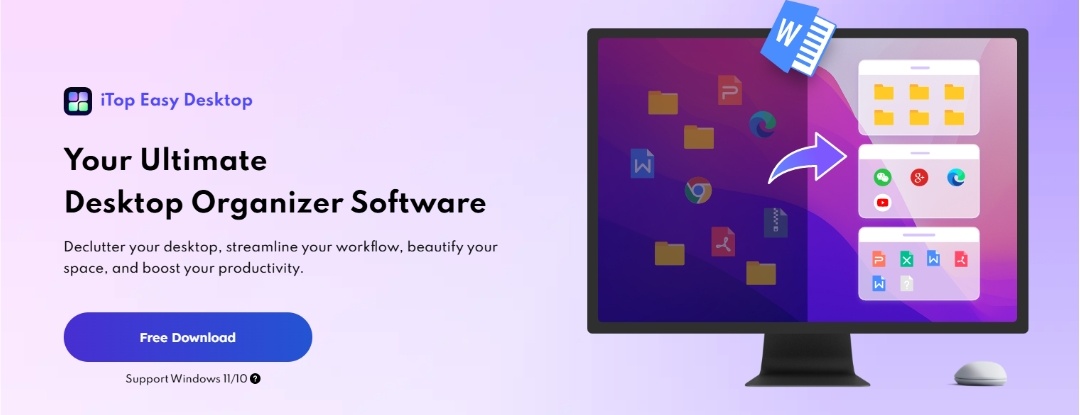
A messy desktop is more than just a bad look—it’s a productivity killer. Every stray file and misplaced folder on your screen acts as a tiny distraction, forcing your brain to process unnecessary clutter before you even begin your real work. While we’ve grown accustomed to this digital chaos, it quietly drains our focus and slows us down. That’s why iTop Easy Desktop was created—to transform clutter into clarity with just a few clicks. In today’s fast-paced digital world, using a tool like iTop Easy Desktop to instantly declutter and customize your workspace is one of the smartest ways to sharpen your focus and reclaim your time. It turns your computer from a source of stress into a clean, intentional, and streamlined engine for peak performance.
What is iTop Easy Desktop
iTop Easy Desktop is an all-in-one desktop organizer and productivity assistant for Windows users. At its core, it’s a solution to the chaos of scattered icons and files. But it goes far beyond simple organization. It intelligently declutters your desktop, groups files into customizable boxes, integrates task management tools, and even enhances your workspace with dynamic wallpapers and themed packs. Think of it as a personal assistant that not only tidies up your digital desk but also helps you stay on schedule, capture ideas, and maintain focus throughout the day. Whether you’re a student, professional, or creative, iTop Easy Desktop transforms your PC into a streamlined hub of efficiency and inspiration.
Product Features of iTop Easy Desktop
iTop Easy Desktop includes a wide range of features built around three pillars: organization, productivity, and personalization. Instead of overwhelming users with endless menus, it offers intuitive features that feel natural and practical. Here’s how it elevates your workflow:
Smart Auto-Organization: With a single click, iTop Easy Desktop sorts your icons into intelligent groups—documents, images, applications, folders—saving you from the endless hunt for files. This automatic decluttering instantly creates a clean, professional-looking workspace.

Personalized Box System: Customization is at the heart of the software. You can create boxes labeled “Urgent,” “Client,” or even separate spaces for work, gaming, and personal use. This flexibility ensures your desktop reflects your priorities and lifestyle.

Visual Inspiration: A workspace should motivate, not bore. With over 20,000 high-definition wallpapers, themed packs, and customizable icons, iTop Easy Desktop lets you design an environment that sparks creativity. From 4K live wallpapers to elegant start menus, your desktop becomes a canvas.
Quick Access & Search Bar: Gone are the days of clicking through multiple folders just to find a file. iTop Easy Desktop features an integrated search bar that retrieves files instantly. Type a few characters and jump directly to the document you need. This eliminates time wasted scanning your desktop manually and ensures no file gets lost in visual clutter.

Workflow Assistant Tools: iTop Easy Desktop goes far beyond simple organization—it works like a smart digital assistant that quietly keeps your day running smoothly. Its built-in tools help you stay on top of everything, from jotting down quick ideas in iNotes to managing your schedule by syncing with Google Calendar and Outlook. Enhance your focus with the popular Pomodoro timer, alternating work sessions and breaks to maximize efficiency. Additional widgets like weather updates, time awareness, and quick folder access keep you informed and reduce distractions.
Screenshots and AI Assistance: You also get an AI assistant powered by ChatGPT, ready to help you write, translate, or generate content without the hassle of creating an account. Even the screenshot tool feels thoughtful, letting you capture long, scrolling pages in one shot—perfect for tutorials, documents, or presentations. Altogether, these features turn the software into something like your own personal desktop secretary, keeping your workflow organized and your tasks within easy reach.
Privacy & Security: Important files deserve protection. The Private Box feature allows you to store sensitive documents, photos, or videos under a password lock, ensuring peace of mind.
Efficiency Enhancers:
Together, these features don’t just tidy your desktop—they create a personalized productivity system that adapts to your needs.
How to Use iTop Easy Desktop
Using iTop Easy Desktop is simple, even for beginners. The setup process takes only a few minutes, and transforming your desktop requires just a few clicks.
- Download and Install: Visit the official iTop Easy Desktop website and download the installer. The installation is fast, lightweight, and doesn’t require complicated setup options. Once installed, launch the software to begin customizing your desktop.
- Auto-Organize Your Desktop: When you open the software for the first time, click the Auto-Organize button. iTop Easy Desktop will instantly analyze your existing desktop items and place them into intelligent Boxes. You can then reposition these Boxes, rename them, or create entirely new ones to match your work habits. For example, you may create today’s work, pending review, study notes, creative projects, drag and drop files between boxes as needed to maintain a neat structure.

- Personalize Your Workspace: Select from thousands of wallpapers and theme packs to give your desktop a fresh look. Try live wallpapers if you enjoy motion visuals. Customize your icons, mouse pointer, and start menu to build a workspace that feels uniquely yours.
- Use Productivity Tools Daily: Start taking advantage of built-in utilities by adding tasks and deadlines using the schedule manager, creating quick notes with iNotes, using the AI assistant for translations or creative help, capturing long screenshots for documentation or content creation, turning on the pomodoro timer when you want to stay focused and if you’re sharing your screen, double-click the desktop to hide boxes instantly for a clean presentation.
Conclusion
A messy desktop isn’t just annoying; it kills your ability to get things done. iTop Easy Desktop solves this problem by combining smart organization, personalized design, and powerful workflow tools into one seamless solution. It’s not just about tidying up; it’s about creating a workspace that motivates you, keeps you focused, and helps you achieve more in less time. From auto-organization to AI-powered assistance, every feature is designed to save time and reduce stress.